Tuesday, March 24, 2020

Some random info about the Olympus OM-D E-M1 Mark III

Last updated on April 12, 2020.

I recently purchased an Olympus OM-D E-M1 Mark III with the M.Zuiko 12-100mm f/4 PRO lens, and have additionally purchased an M.Zuiko 25mm f/1.8 lens to go with it. I've been shooting a lot with this camera, even in the midst of this coronavirus pandemic (before New York essentially went into lockdown) and have been thoroughly enjoying it.

This post is just to serve as a space for random notes and information about the camera. It isn't going to be as polished as my usual content, but perhaps some of this information will be useful to others. I'll be updating it as needed.
  • Sensor readout speed is normally about 1/60s. If the ISO sensitivity is set to 8000 or higher, it is about 1/30s. This is reflected in the flash sync speeds when shooting in silent mode (♥ heart symbol), which are 1/50s at ISO 6400 and below and 1/20s at ISO 8000 and above. In comparison, the flash sync speed of the mechanical shutter is 1/250s. (Note that flash is disabled by default in silent mode but can be enabled in the menu, under Shooting Menu 2, Anti-Shock[♦️]/Silent[♥].)
  • Accessing the camera's hidden service menu, including the shutter count, is actually simpler than what some online guides may state, e.g. this article. To do this, hold the Menu button when turning on the camera, then open the menu, open the brightness settings (Setup Menu, fourth item), and press OK. (There is no need to press Right or Info on this screen.) Then press Up, Down, Left, Right, and the shutter button, in that order. From here, pressing Right will show the camera's internal counters:
    • MS is the number of mechanical shutter actuations. This does not include shots taken with the electronic shutter, and does account for operations like pixel mapping (which requires four shutter actuations) which use the mechanical shutter. This means that the value displayed here can be relied on as an accurate shutter count. (Older Olympus cameras used R for shutter releases, which wasn't an accurate shutter count because it included electronic shutter usage.)
    • S (strobe) is the number of times the camera has fired a flash (there's no pop-up flash but the camera does count shoe-mounted flashgun usage).
    • U is the number of times the camera has activated the Supersonic Wave Filter, which removes dust from the sensor. This can be used to estimate the number of power cycles because the camera activates the SSWF every time it is turned on; however, the SSWF is also activated during pixel mapping (Custom Menu J1) so it won't be an exact value.

Tuesday, April 30, 2019

Using Wi-Fi on Panasonic LUMIX cameras to send photos directly to your PC as you take them

An underappreciated feature of many newer Panasonic LUMIX cameras is the ability to connect to a computer via Wi-Fi and send pictures directly to a shared folder. Essentially, the camera can log onto your computer, connect to an SMB share, and write photos to it. However, depending on your setup, it can take some finesse to get it to do what you want. In this blog post, I'll describe how to set up your camera to send photos directly to your PC, even when you're away from a Wi-Fi network.

To begin, press the Wi-Fi button on the camera and select New Connection > Send Images While Recording > PC. The Via Network option connects to a wireless network and is for sending images with the computer connected to that network, which works if you're at home or in a studio with a wireless router. The Direct > Manual Connection option shows the camera's SSID (network name) and password to use for the computer to connect to the camera; the computer will connect directly to the camera, independently of any wireless network. However, this is where things get tricky.

Tuesday, February 19, 2019

Using an SSD as a Linux swap device isn't (usually) as destructive as you thought it would be

It's been a while since I've posted something on this blog but there's something I'd really like to get out of my head.

I've read, and continue to read, claims from others on the Internet that putting swap space on an SSD is bad for it and will quickly kill it. However, these statements rest on the assumption that the swap space will be used heavily or that the SSD's endurance is low enough that this would cause it to fail well before the end of its designed service life. In the vast majority of situations, neither of these are true. Even on bottom-bin hardware like Bifrons (a cheap Lenovo netbook with 2 GB of memory and 64 GB of eMMC flash storage), where endurance is more likely to be an issue, it's still very likely that the flash memory will last the intended life of the system.

Several months back, I took an old 64 GB Plextor M5M mSATA SSD previously used in one of my old laptops, put it in a StarTech USB 3.1 Gen 2 enclosure, and plugged it into the USB 3.0 port on this laptop. I then secure-erased it, partitioned 8 GB of that drive as a swap partition, and enabled it as swap space. Using the Linux iostat command, I monitored the amount of data written to the drive over time as I used the system for everyday web browsing and productivity. The worst I saw was 170 GB of writes to the drive over just shy of nine days of usage, or about 20 GB of writes per day from swapping. Remember that this system has just 2 GB of memory so some swapping is likely to be unavoidable. It's also noteworthy that swappiness was set to 100, which makes the system swap more aggressively than normal (the default is 60).

20 GB per day is well within the endurance limits of most modern SSDs. A good name-brand SSD like the Samsung SSD 860 EVO will be rated for far more than that over its warranty period; the 250 GB version of the 860 EVO is warranted for five years or 150 TBW (total terabytes written). That's 84 GB per day over five years, and 20 GB is less than a quarter of this value. Even if you add another 10 GB per day (because a typical user would put the system/boot partition and the swap partition on the same disk), you're still not using even half of the drive's rated endurance within its warranty period. Even cheaper SATA SSDs with lower endurance ratings are unlikely to fail under this kind of workload.

This does not mean that swap is completely harmless, as endurance problems can still occur if you're swapping to a low-cost, low-capacity flash memory device. The eMMC flash module on Bifrons is rated by its manufacturer (SanDisk) for 44 TBW of endurance. This is 40 GB per day over three years, or 24 GB per day over five years, which should be enough to last the service life of the device. However, eMMC modules are permanently installed in the device and cannot be replaced without highly-specialized equipment (they are soldered onto the motherboard). Furthermore, the limited capacity of the device means that the typical consumer will use most of its capacity, which increases write amplification and reduces the effective endurance of the NAND, possibly below its specifications, and many netbooks of this kind have just 32 GB of storage which further compounds the endurance issue. (The same also applies to low-cost external flash memory devices like SD cards or USB flash drives.) This is, in fact, the reason I put the swap onto an external SSD and not on the system's onboard flash memory.

But this isn't the case for the vast majority of system configurations, where the benefits of placing swap on an SSD outweigh the risks. Most flash memory devices are far faster than any electromechanical hard drive; even if swapping significantly degrades system performance, the performance impact of swapping to an SSD is much lower than swapping to spinning rust. The above endurance issues only truly apply if 1) you're swapping to a cheap and small flash memory device like an eMMC chip or USB flash drive; and 2) your system has low memory and your usage patterns are such that you need to swap more than occasionally. Most systems have enough memory that swapping only happens rarely, if at all, rendering the whole endurance issue moot. And even when swapping is necessary, the drive isn't going to be written to so much that it'll exhaust the endurance of the drive and cause it to fail prematurely. Swapping isn't going to cause the drive to get hundreds of gigabytes or terabytes of writes per day. The 20 GB per day figure is the highest that one might encounter in a typical day of usage, and most users aren't going to see this much swapping.

If endurance is still a concern, there are solutions like zram which can effectively compress the contents of system memory and therefore allow more data to be stored in RAM before the system needs to swap to disk. While this comes at the cost of increased CPU usage, you'll still get better performance than if you're swapping to disk, and fitting more data into memory means that less data needs to be swapped out and written to the flash memory.

Ultimately, for the vast majority of use cases, putting swap on your SSD isn't going to kill it.

Tuesday, August 21, 2018

On NVIDIA GeForce RTX and the state of competition in the graphics card market

On August 20, 2018, NVIDIA launched a new line of graphics cards based on their new Turing architecture. Branded as GeForce RTX, these new cards boast several significant new features, including:
  • Fixed-function ASIC ray-tracing units, enabling real-time ray-tracing for the ultimate in realism (more on that below)
  • Tensor cores for AI. There are myriad applications for this, one of which is faster and smarter anti-aliasing.
  • Datacenter-grade NVLink connectivity for SLI, providing as much as 50 times the bandwidth of conventional SLI connections.
  • Redesigned shader cores with new features like Variable Rate Shading for higher performance.
  • More CUDA cores and higher efficiency enabled through the TSMC 12FFN process designed specifically for NVIDIA.
Undoubtedly, the most important new feature is the real-time ray-tracing capability. Ray-tracing enables the most realistic lighting effects possible by actually computing the paths that light rays travel. This process is extremely computationally expensive, which means it's long been been limited to movies and other media which do not require real-time graphical rendering. Instead, video games use simpler rasterization techniques which provide approximations of lighting effects. NVIDIA's new RTX graphics cards contain specialized hardware designed specifically to accelerate ray-tracing, enabling cinematic lighting effects that would otherwise be impossible to implement in video games and other real-time applications. NVIDIA has also developed RTX middleware, built on the DirectX Raytracing API, to enable game developers to take advantage of this functionality more easily.

However, there is a more sinister side to these new graphics cards.

Saturday, July 14, 2018

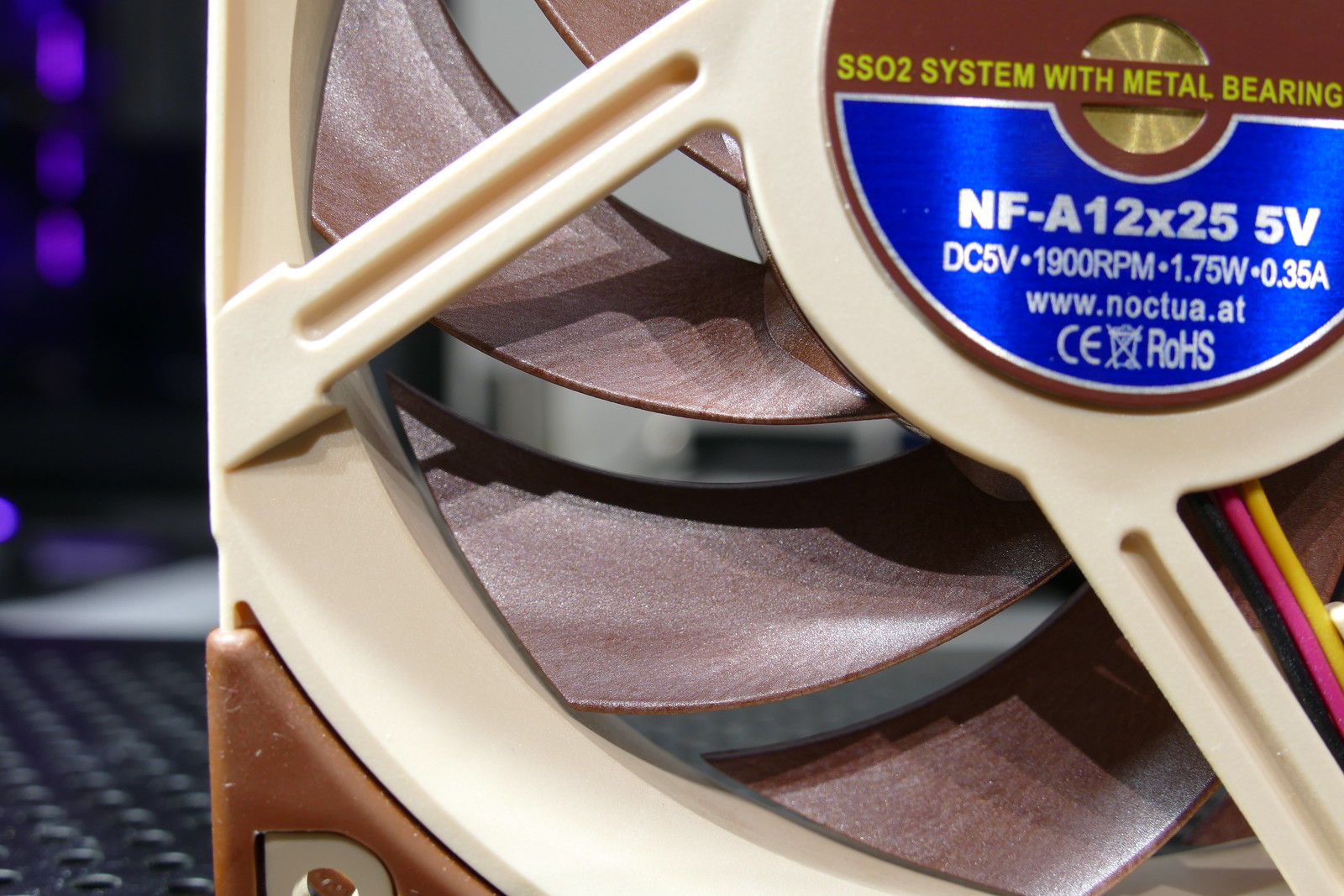
On the Noctua NF-A12x25: the most advanced fan ever made?

https://www.flickr.com/photos/57993471@N06/43395501561/

Call me crazy, but I've fallen in love with a cooling fan.

The Noctua NF-A12x25 (link to standard PWM version for use in PCs) is by far the most technologically advanced fan ever made by the Austrian cooling solutions company. It took four and a half years to develop with more than than 200 prototypes made, and even required the development of an expensive, proprietary plastic material for the impeller. The result is an engineering masterwork of a fan that outperforms anything else like it.

The specific version of the NF-A12x25 I have is the 5V model. While this means that it's not directly usable in most PCs, as fan headers are typically 12V, the 5V version comes with a USB adapter, which opens up endless new possibilities. One can now use it to cool practically anything, from set-top boxes to mini-fridges (that was my idea). This particular model, along with several other 5V fans spanning nearly the entire Noctua lineup from 40mm to 200mm, was announced on July 4, 2018.

The key to the NF-A12x25's impressive performance is a proprietary liquid-crystal polymer called Sterrox. LCPs are a unique class of plastics which exhibit very high rigidity and strength due to their molecular structure, which is more orderly than those of traditional plastics. Noctua went through the trouble of developing their own plastic material because a key design goal was to minimize tip clearance: the spacing between the tip of the impeller blades and the frame. With conventional plastics like PBT, over several years of continuous use, the blades can actually stretch slightly, which means there needs to be some leeway between the impeller and the frame. However, this gap results in some airflow being lost, and in situations requiring high static pressure, like a fan attached to a processor heatsink or liquid cooler radiator, air can leak back through this gap. LCPs like Sterrox exhibit far better stability over time and therefore allow for a much narrower tip clearance, as little as 0.5mm, when most PC case fans have closer to a 1.5mm to 2mm gap. (Notice, in the image above, just how close the blades are to the frame!) The high rigidity of the Sterrox material also makes the fan blades less prone to surface vibrations which can create added noise during operation.

Thursday, December 28, 2017

$60 is not enough: The problem with video game development costs and monetization

As a video game consumer, I am deeply concerned about recent trends in game design and monetization.

Over the last few months, several major premium "AAA" game titles, including Middle-earth: Shadow of War, Star Wars Battlefront II, and Forza Motorsport 7, have launched with a relatively new and controversial type of in-game item known as a loot box. Loot boxes, when opened, provide one or more random in-game items, which are not known until they are opened. Depending on the game, these can range from cosmetic modifications such as skins that have no impact on gameplay, to weapons, armor, and other equipment which significantly alter gameplay. Items in a loot box are typically grouped by rarity, and some items available from loot boxes can be more desirable than others, such as a rare skin for a playable character or a particularly powerful weapon. This encourages players to acquire more loot boxes for more chances to get better items. Depending on the game, loot boxes can be obtained over the course of normal play, with in-game currency, and/or with real money.

The random nature of loot boxes leverages the same psychological principles behind gambling to make the process of obtaining and opening them addictive. This is further reinforced by the fact that games which use loot boxes often do not permit players to purchase specific items directly, even with real-world currency. The game's mechanics are also often designed to encourage purchasing loot boxes by making it difficult and time-consuming to progress in a game through normal gameplay. As a result, loot boxes have drawn regulatory attention, with some jurisdictions considering treating loot box systems as gambling. The gambling-like nature of loot boxes has also drawn sharp criticism from both the press and the player community, which consider such systems to be predatory to consumers while degrading the game experience for those who do not pay for loot boxes. Compounding this is the fact that players already need to spend up to US$60 to begin playing the game in the first place.

More generally, the use of microtransaction systems which allow players to purchase in-game items with real money has drawn criticism, especially where such purchases allow paying players to obtain a significant advantage over others in competitive multiplayer gameplay or where the game's mechanics are balanced in such a way that they make normal progression unusually tedious without real-money purchases.

These trends in video game monetization have led to gamers claiming that the video game industry has become greedy and exploitative of its customers. With major game publishers like Take-Two Interactive reporting significant increases in revenue and profit, this can certainly appear to be the case. However, the truth is far more complicated than this.

Monday, December 4, 2017

How to save energy on gaming: Experiments with lowering power target on the GeForce GTX 1080 Ti

Before I begin, I'd like to provide some relevant background information.

My bedroom has a tendency to trap heat, and is usually the warmest room in the house. It also faces west, which means that in the summer months, the room can get unbearably hot unless the central AC system is turned on full-blast, complicated by the fact that there is only one HVAC register in the room. With the Astaroth desktop's power draw often exceeding 400W under full gaming load, converting most of this energy into heat, keeping the room at a reasonable temperature during long gaming sessions can be challenging.

This led me to the question: How do I get the system to run cooler and use less energy without unacceptably degrading game performance? Read on for the answer...